获取Spring中所有web请求接口的path和method
1.概述
最近在开发一个项目的过程中,遇到一个需求,需要去汇总拿到系统中所有的请求接口,然后集中进行一些处理。
我这里大概有两种思路:
众所周知,接口都是定义在Controller层的,我们通过Spring容器拿到那些Controller层的Bean的class,然后通过反射拿到所有的该类方法,然后依次获取每个方法的注解(主要是获取那几个和RequestMapping相关注解),这种方案我写到一半,觉得太过于繁琐了,这里需要考虑的情况有很多,
- 可以使用
@RestController()和@Controller标注控制层。 - Controller类上面也可以有
@RequestMapping注解, @RequestMapping注解的变形又还有5种,GetMapping, PostMapping, PutMapping, DeleteMapping, PatchMapping- Mapping注解又有两个属性可用于定义path,默认值value和path,而且均是数组的形式。
- 路径参数上
/的兼容也很难处理,有些开发者开头不写/,有些又要写这玩意儿。
我写着写着,代码越来越复杂,有点像屎山了。就想到了另外一种方案。
使用spring开发web应用的时候,要能够处理请求映射关系是肯定会提前收集好对应的路径和handler之间的映射关系的,然后我就从DispatcherServlet的doDispatch方法开始调试代码,很明显会在里面的
mappedHandler = getHandler(processedRequest);方法调用中获取到handler。调试进入,
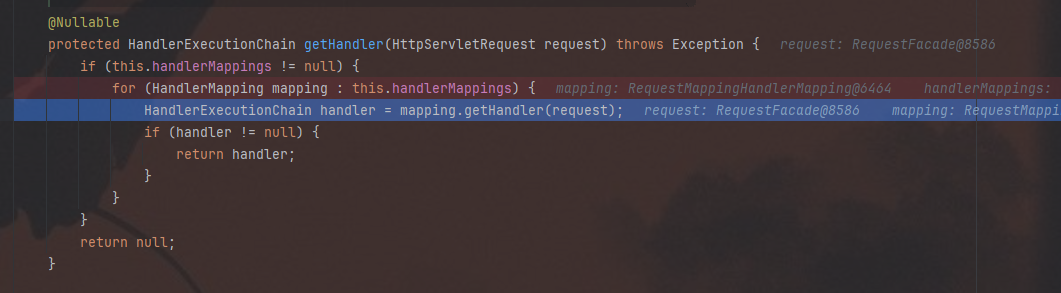
可以看到就是在遍历handlerMappings
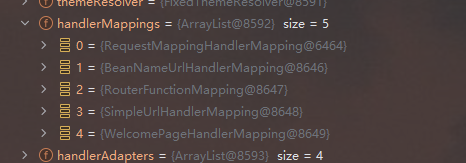
去查了一下这几个handlerMapping的资料。
- RequestMappingHandlerMapping:
- 这是Spring MVC中用于处理基于注解的请求映射的核心组件。
- 它主要处理带有
@RequestMapping、@GetMapping、@PostMapping 等注解的方法。 - 通过这些注解,你可以将HTTP请求映射到特定的方法上,从而处理不同的请求。
- BeanNameUrlHandlerMapping:
- 这是一个简单的URL到处理器映射策略,它将URL路径映射到Bean的名称。
- 通常不推荐使用,因为它依赖于Bean的名称,而不是更灵活的路径表达式或注解。
- RouterFunctionMapping:
- 这是Spring WebFlux的一部分,用于处理基于函数式编程的路由。
- 它允许你使用函数式编程风格来定义路由,而不是传统的Controller方法。
- 这种方式更适用于响应式编程模型,例如使用
RouterFunctions 定义路由。
- SimpleUrlHandlerMapping:
- 这是一个简单的URL到处理器映射器,它允许你通过代码配置URL到处理器的映射。
- 它不依赖于注解,而是通过在Spring配置中显式定义URL和处理器的映射关系。
- WelcomePageHandlerMapping:
- 这个映射器用于处理欢迎页面的请求。
- 当一个目录请求被发送到服务器时(例如访问根目录
/),它会被映射到欢迎页面。 - 通常用于定义默认页面或目录索引页面。
不难看出来,满足我们需求的就是RequestMappingHandlerMapping,调试的时候仔细看了一下,确实找到了路径到handler的映射
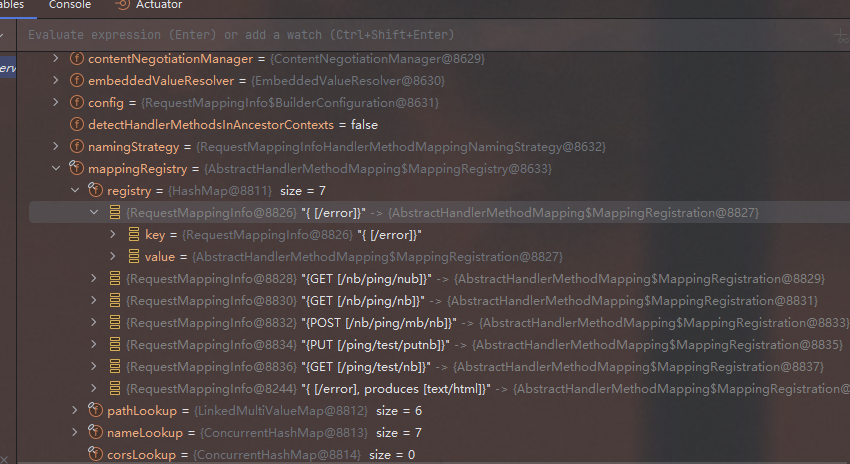
之后就是从spring容器中获取这个bean,然后进行各种路径收集等操作。
2.具体代码实现
 1
 2
 3
 4
 5
 6
 7
 8
 9
10
11
12
13
14
15
16
17
18
19
20
21
22
23
24
25
26
27
28
29
30
31
32
33
34
35
36
37
38
39
40
41
42
43
44
45
46
47
| package com.ruayou.client.manager;
import org.springframework.beans.BeansException;
import org.springframework.context.ApplicationContext;
import org.springframework.context.ApplicationContextAware;
import org.springframework.web.method.HandlerMethod;
import org.springframework.web.servlet.mvc.condition.RequestMethodsRequestCondition;
import org.springframework.web.servlet.mvc.method.RequestMappingInfo;
import org.springframework.web.servlet.mvc.method.annotation.RequestMappingHandlerMapping;
import java.util.HashSet;
import java.util.Map;
import java.util.Set;
/**
* @Author:ruayou
* @Date:2024/7/18 0:22
* @Filename:RequestPathFinder
*/
public class RequestPathFinder implements ApplicationContextAware {
ApplicationContext applicationContext;
@Override
public void setApplicationContext(ApplicationContext applicationContext) throws BeansException {
this.applicationContext = applicationContext;
}
public Set<String> getAllRequestPath() {
HashSet<String> set = new HashSet<>();
RequestMappingHandlerMapping mapping = applicationContext.getBean(RequestMappingHandlerMapping.class);
for (Map.Entry<RequestMappingInfo, HandlerMethod> requestMappingInfoHandlerMethodEntry : mapping.getHandlerMethods().entrySet()) {
RequestMappingInfo key = requestMappingInfoHandlerMethodEntry.getKey();
Set<String> patternValues = key.getPatternValues();
RequestMethodsRequestCondition methods = key.getMethodsCondition();
patternValues.forEach((pa)->{
if (!methods.isEmpty()) {
methods.getMethods().forEach((m)->{
set.add(m.name()+" "+pa);
});
}
});
}
set.forEach(s -> System.out.println(s)
);
return set;
}
}
|
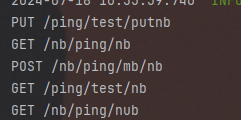
方法的运行结果如上图,可以正确获取到自己定义的接口(必须是通过注解定义的才能获取到!)